High-Performance TradingView Signals Setup (2026): Pine Script Strategy + Alerts + Risk Controls
Many traders hit the same wall. They have an entry idea, maybe even a backtest that looks decent, and they can get alerts firing in TradingView. But when they try to make it operational, familiar problems show up: signals repaint, alerts duplicate, sessions skew performance, or the webhook arrives without enough structure to execute safely.
That is the real challenge. The hard part usually is not inventing a clever condition. It is building a signal pipeline that behaves the same way live as it does on the chart.
This guide takes the practical route. We will build a minimal but dependable workflow: a Pine Script strategy, confirmed bar-close logic, clean alerts, and embedded risk controls. The goal is not to promise profitability. It is to help you create something stable enough to trust before you automate anything.
What a reliable setup actually includes
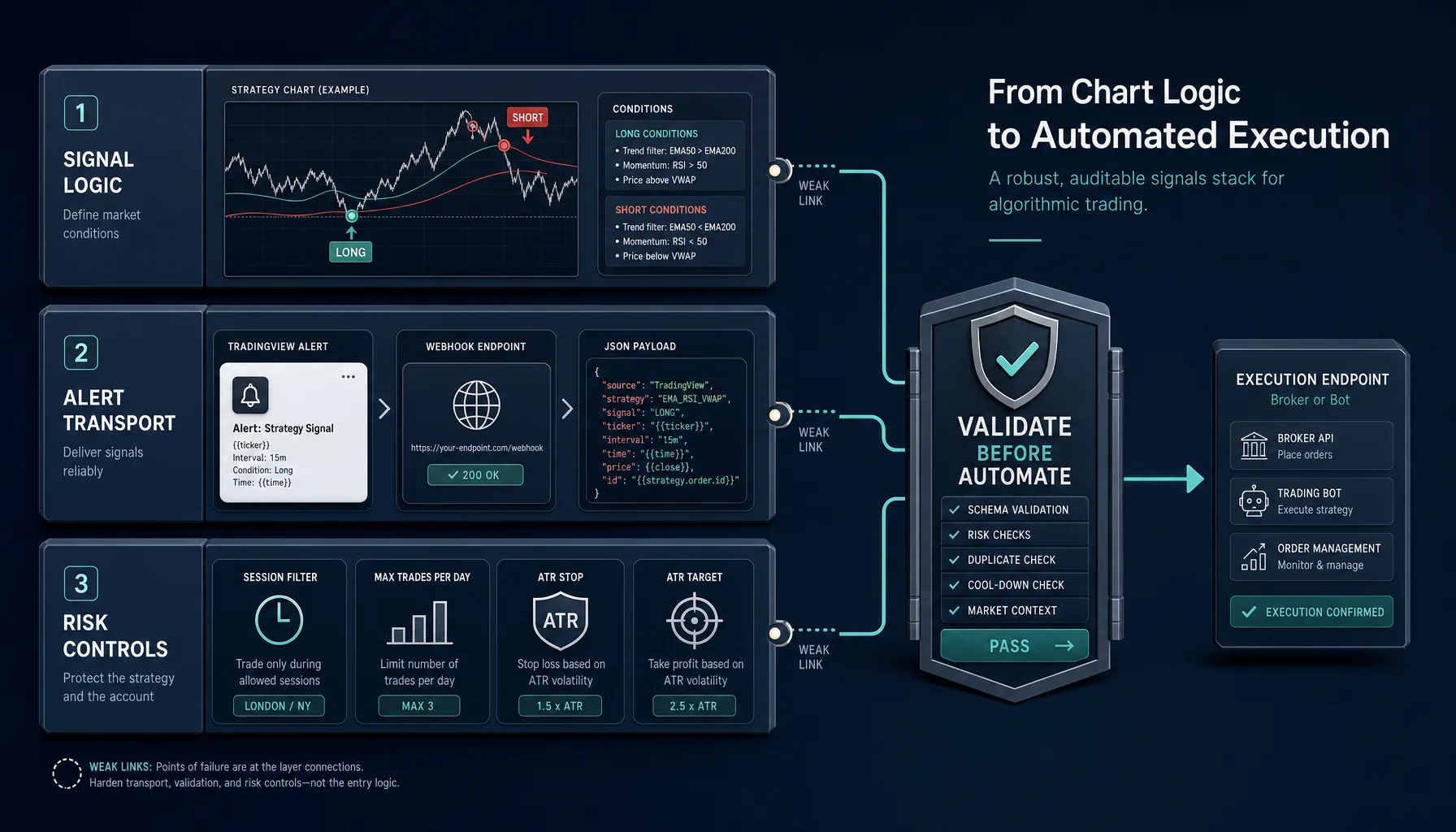
A dependable workflow has three layers, and it helps to separate them from the start.
Signal logic: your long and short conditions
This is the part most traders obsess over. It defines when a trade idea exists. For example, you might go long when price is above a moving average and momentum confirms the move.
That matters, but it is only one layer. A good condition can still fail in practice if it triggers intrabar, conflicts with your alert settings, or fires in poor market conditions.
Execution layer: alerts, webhooks, and payload structure
This layer carries the decision. TradingView can send alerts through an HTTP POST using its webhooks feature.
Most live failures happen here, or where logic meets transport. Common examples:
- the alert fires more than once
- the payload is missing stop or target values
- the symbol format does not match your broker or exchange
- the strategy backtests on bar close, but the alert is configured intrabar
Risk layer: session filters, trade limits, and ATR-based exits
This is not an optional add-on. It is part of signal quality.
A session filter removes trades during weak market conditions. A max-trades-per-day rule prevents signal spam. ATR-based exits adapt risk to actual volatility instead of treating every regime the same.
If you remember one thing, make it this: the edge is not in making alerts fire more often. It is in making them fire only when they are stable, intentional, and executable.
Start with a minimal Pine Script strategy
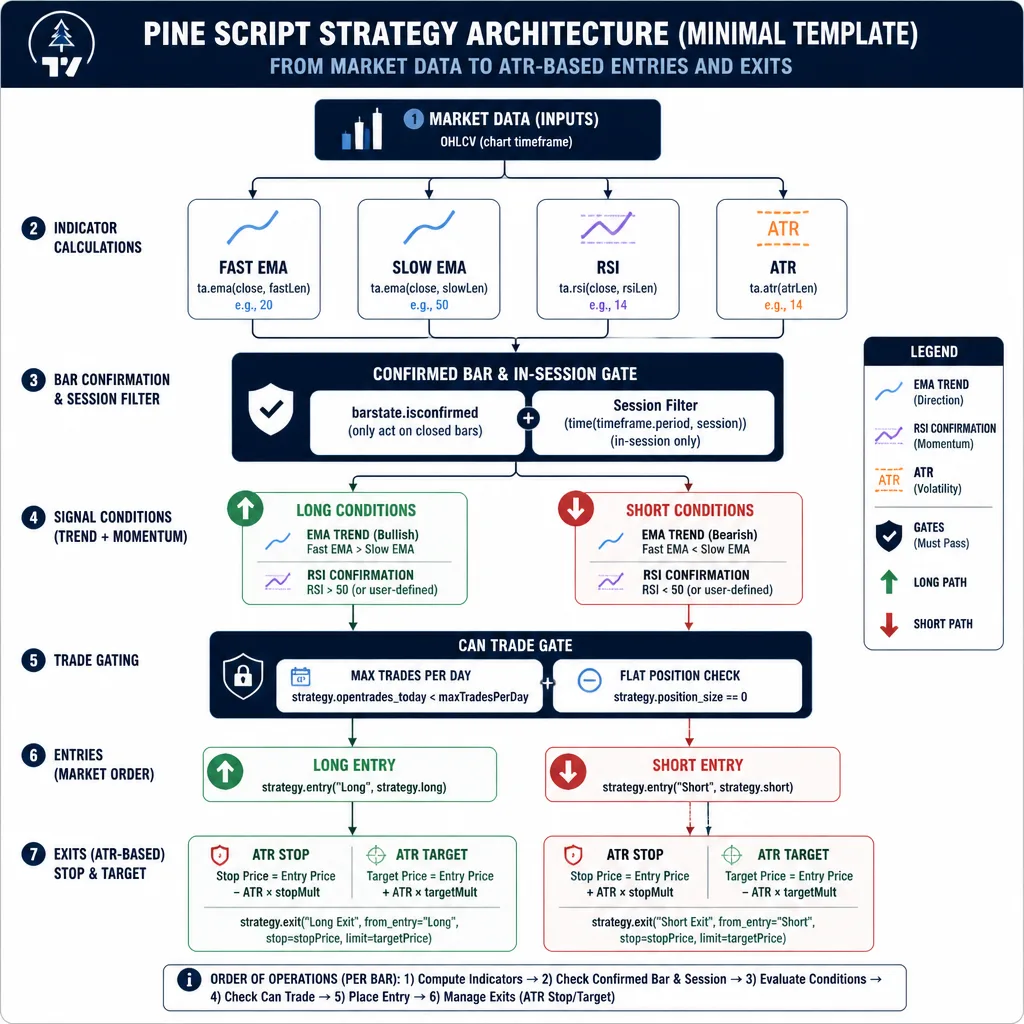
For automation-ready workflows, a strategy-first build is usually cleaner than starting with an indicator. A strategy keeps entries, exits, and backtest behavior in one place, which makes it easier to align testing with live alerts.
You do not need complicated logic here. In fact, simple is better.
Use simple entry logic so the infrastructure stays visible
A trend filter plus a momentum check is enough for a template:
- trend: fast EMA above slow EMA for longs, below for shorts
- momentum: RSI above 55 for longs, below 45 for shorts
These are not magical settings. They are just readable. When the logic is simple, it is easier to see whether the system itself is robust.
Build long and short conditions with bar-close confirmation
Here is a compact structure using current TradingView Pine Script documentation conventions:
//@version=6
strategy("Minimal Robust Signal Stack", overlay=true, pyramiding=0, process_orders_on_close=true)

fastLen = input.int(20, "Fast EMA")
slowLen = input.int(50, "Slow EMA")
rsiLen  = input.int(14, "RSI Length")
atrLen  = input.int(14, "ATR Length")
atrSL   = input.float(1.5, "ATR Stop Multiplier")
atrTP   = input.float(2.0, "ATR Target Multiplier")
maxTradesPerDay = input.int(3, "Max Trades Per Day")
sessionInput = input.session("0700-1700", "Trading Session")

fastEMA = ta.ema(close, fastLen)
slowEMA = ta.ema(close, slowLen)
rsiVal  = ta.rsi(close, rsiLen)
atrVal  = ta.atr(atrLen)

inSession = not na(time(timeframe.period, sessionInput))
confirmedBar = barstate.isconfirmed

longCondition  = confirmedBar and inSession and fastEMA > slowEMA and rsiVal > 55
shortCondition = confirmedBar and inSession and fastEMA < slowEMA and rsiVal < 45

newDay = ta.change(dayofmonth(time))
var int tradesToday = 0
if newDay
    tradesToday := 0

canTrade = tradesToday < maxTradesPerDay and strategy.position_size == 0

if longCondition and canTrade
    strategy.entry("Long", strategy.long)
    tradesToday += 1

if shortCondition and canTrade
    strategy.entry("Short", strategy.short)
    tradesToday += 1

longStop  = strategy.position_avg_price - atrVal * atrSL
longTarget = strategy.position_avg_price + atrVal * atrTP
shortStop = strategy.position_avg_price + atrVal * atrSL
shortTarget = strategy.position_avg_price - atrVal * atrTP

strategy.exit("Long Exit", from_entry="Long", stop=longStop, limit=longTarget)
strategy.exit("Short Exit", from_entry="Short", stop=shortStop, limit=shortTarget)
Keep entries and exits clean
This template gets a few important things right:
- conditions are named clearly
barstate.isconfirmedis built into the logic- the session filter is part of the strategy
- daily trade count is enforced before entry
- ATR values drive exits automatically
That gives you a workable signal stack, not just something that looks fine on a chart.
The anti-repaint rule: validate signals only after the bar closes
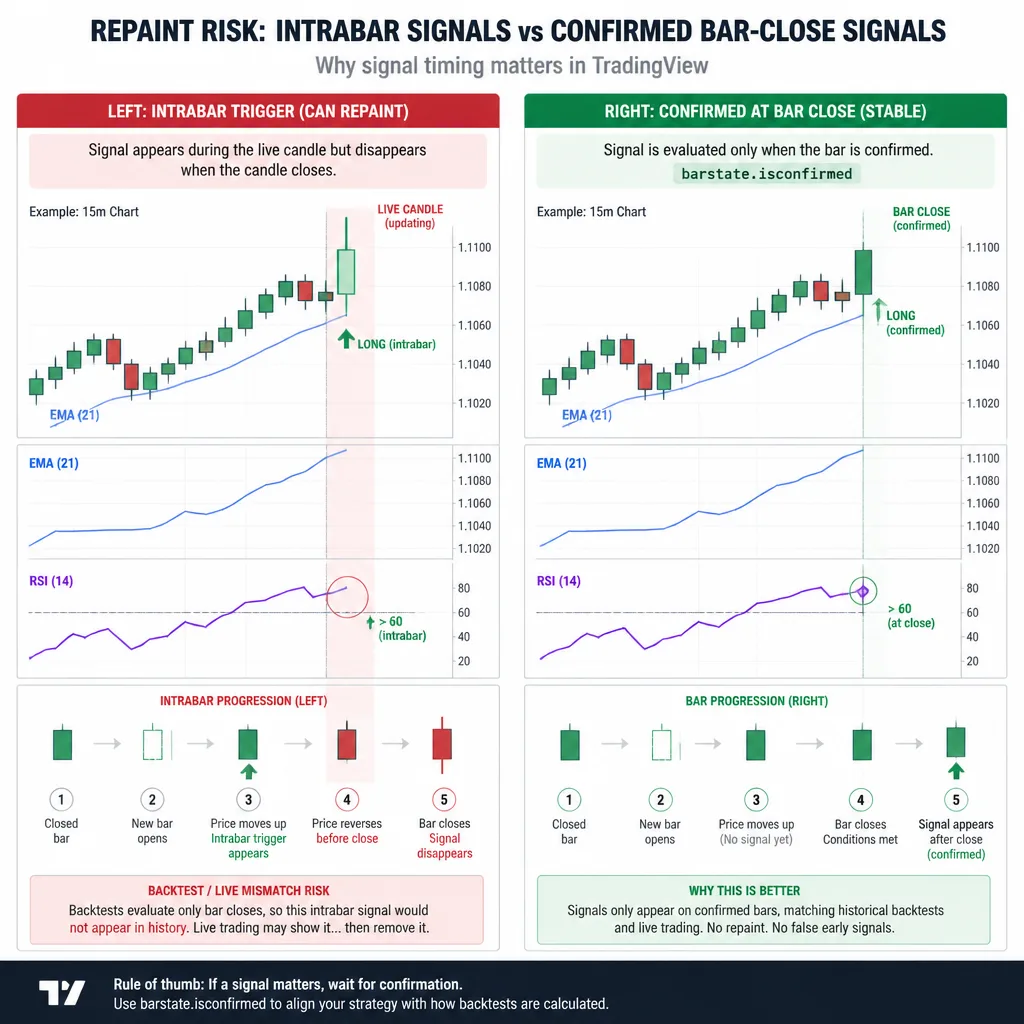
This is where many decent setups quietly fail.
Why intrabar signals create false confidence
A signal can appear valid halfway through a candle, then disappear before the candle closes. On a screenshot, that often looks harmless. Live, it is a problem.
If your automation reacts to a condition that existed only briefly intrabar, you are not executing the strategy you tested. You are executing a noisier version of it.
That is one of the main reasons backtests and live alerts diverge.
How barstate.isconfirmed improves reliability
Using barstate.isconfirmed means the logic waits for the candle to finish before treating the condition as real.
That does two useful things:
- It removes unstable mid-bar triggers.
- It brings alerts closer to chart history and backtest behavior.
If you plan to automate, bar-close confirmation should be your default unless you have a specific reason to do otherwise.
Which Pine Script patterns can still mislead you
Bar-close confirmation helps, but it does not solve everything.
The biggest caution area is higher-timeframe data with request.security. It is easy to misunderstand how that behaves, especially when historical bars and live bars do not line up the way you expect. Multi-timeframe logic is not automatically unsafe, but it deserves separate validation.
A practical rule: if your setup uses higher-timeframe context, treat it as a second testing project, not a minor script upgrade.
Add risk controls before you think about automation
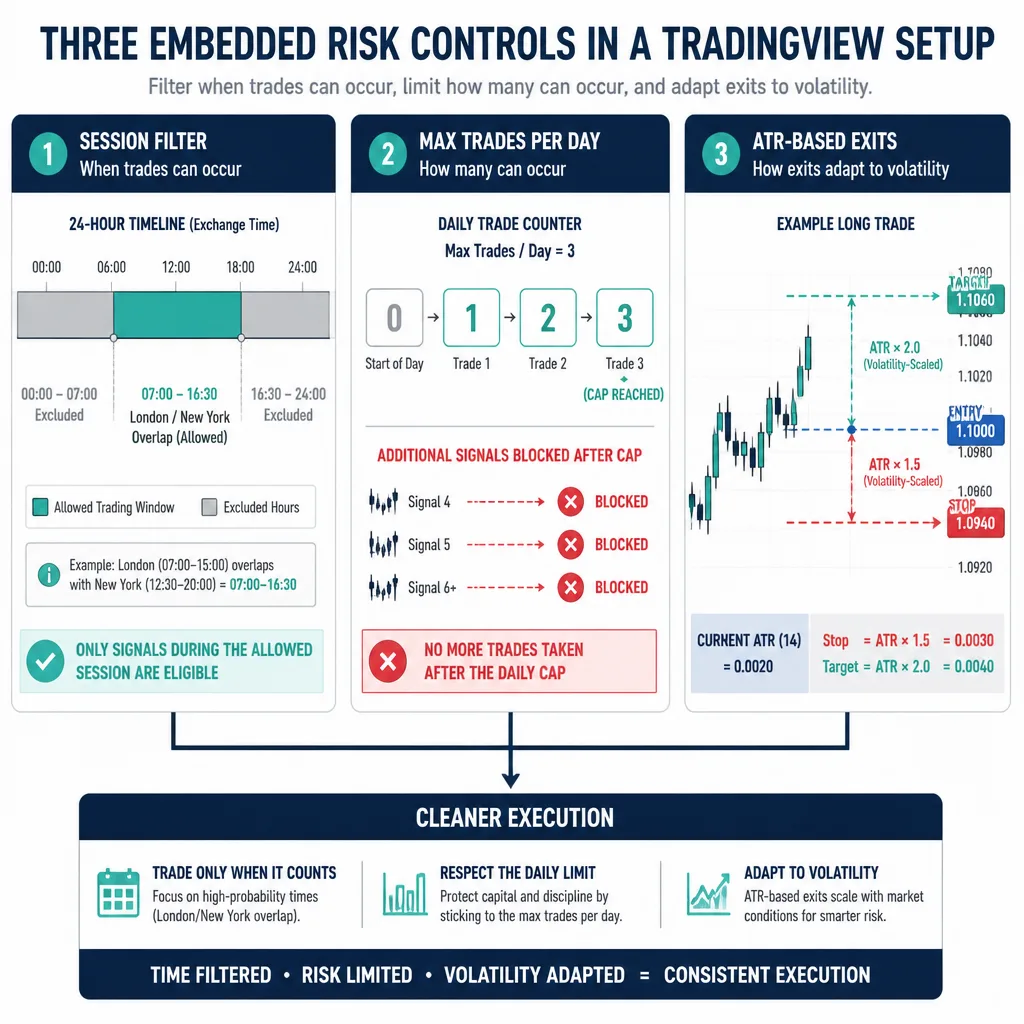
Risk controls do more than protect capital. They also improve signal quality by filtering bad context.
Session filter: trade only when conditions are valid
For forex, this matters a lot. A breakout that looks strong during the London/New York overlap can turn into noise during thin rollover periods.
A practical example: a EUR/USD trend system might behave reasonably from the London open through the active U.S. morning, then degrade during quiet hours when spreads widen and momentum fades.
For crypto, the market runs 24/7, but session behavior still matters. Weekend liquidity can be thinner. Some pairs behave very differently during Asia hours than during U.S. hours. The answer is not to ignore sessions. It is to use time-of-day behavior intelligently.
Max trades per day: stop overtrading and alert spam
This is one of the simplest high-value controls you can add.
If a strategy only looks acceptable because it fires 14 times a day, that tells you something important. A daily cap forces selectivity and protects your downstream automation from alert floods.
It also makes debugging easier. When too many alerts fire, traders often blame the webhook. Often the signal logic is simply too noisy.
ATR-based stop loss and profit target: volatility-aware exits
Fixed stops look neat in examples and brittle in practice.
ATR-based exits are a better default because they scale with volatility. If the market expands, the stop widens. If volatility compresses, the stop tightens.
That does not mean ATR is always best. Some systems need structure-based stops. But for a minimal, robust template, ATR is practical and easy to maintain across changing conditions.
Design a clean alert architecture
Once the strategy behaves properly, you can turn it into an alert workflow.
When to create alerts from strategy conditions
Use alerts tied to the same confirmed conditions that drive your strategy logic. That keeps your backtest and live workflow aligned.
The mistake to avoid is simple: backtest one set of rules in a strategy, then build live alerts from a slightly different indicator condition. That is how people end up running two different systems without realizing it.
How to structure a webhook payload
Your webhook payload should be machine-readable, compact, and consistent.
A practical JSON example:
{
  "strategy": "Minimal Robust Signal Stack",
  "version": "1.0.0",
  "symbol": "OANDA:EURUSD",
  "timeframe": "15",
  "side": "buy",
  "action": "entry",
  "timestamp": "{{timenow}}",
  "bar_confirmed": true,
  "stop_loss": 1.0825,
  "take_profit": 1.0860,
  "risk_model": "ATR_1.5_2.0"
}
What fields should be included
At minimum, include:
- strategy name
- version tag
- symbol
- timeframe
- side or action
- timestamp
- stop loss
- take profit
The version field matters more than many traders realize. If you change one line in your script and live behavior shifts, you want to know which revision produced which alert.
Also watch symbol mapping. TradingView symbols do not always match broker or exchange API symbols exactly. That mismatch breaks automation more often than beginners expect.
A practical framework for going live: the 4-layer validation test
Do not automate live trades until all four layers pass.
Logic validation: does the strategy behave as intended?
Look beyond net profit. Check:
- are entries happening where the rules say they should?
- is trade frequency reasonable?
- do session filters actually block bad hours?
- does the daily cap matter?
- are ATR exits proportionate to the market?
A strategy that works only because of unrealistic frequency or loose assumptions is not ready.
Chart validation: do plotted signals match the rules visually?
This sounds basic, but it catches a lot.
Scroll through the chart and inspect individual trades. If you cannot explain why a signal appeared, the system is not ready. Visual validation often exposes logic drift faster than performance stats do.
Alert validation: do alerts fire exactly once under the right conditions?
This is where you test the actual TradingView alerts, not just the script.
Make sure alerts:
- fire on bar close
- do not duplicate
- carry the correct payload
- align with the entries you see on the chart
A strong script can still fail here if the alert frequency settings are wrong.
Execution validation: does your webhook receiver handle real payloads safely?
Your receiving system should do more than accept messages. It should reject bad ones too.
A decent middleware layer should:
- validate required fields
- log incoming payloads
- reject malformed JSON
- detect duplicate messages
- avoid placing the same order twice
That last point matters. Many traders think automation risk starts at the broker. Often it starts one step earlier, in poor alert hygiene.
Common failure points
Duplicate alerts from poor configuration
This often comes from setup issues, not logic.
Examples include overlapping alerts on the same condition, wrong frequency settings, or downstream systems retrying requests without deduplication. If you get duplicates, inspect the full chain before rewriting the script.
Mismatch between backtest entries and live alerts
This is one of the biggest misconceptions in TradingView automation.
If your strategy assumes bar-close behavior but your live alert can trigger intrabar, you are no longer trading the same system. The same goes for exits. If the strategy manages ATR exits internally but your live setup ignores them, the match is broken.
Overfitted entry logic with weak operational controls
Complex strategies often look smarter than they are.
The problem is not only statistical overfitting. It is maintenance risk. If your conditions are too layered to audit quickly, small changes can alter live behavior in ways you do not catch until later.
A simpler strategy with cleaner controls is often more useful than a “better” one you cannot trust.
Ignoring market session behavior
The same logic can behave very differently across liquidity regimes.
Forex around the London open is not the same as forex during rollover. Crypto on a quiet weekend is not the same as crypto during a volatile U.S. session. A robust setup respects that instead of pretending every hour is equal.
Conclusion
A high-performance TradingView setup is not mainly about finding a brilliant indicator combination. It is about building a signal pipeline that stays trustworthy under live conditions.
The right build order is simple: start with minimal strategy logic, require bar-close confirmation, add risk controls inside the script, structure alerts cleanly, and validate the whole stack layer by layer before automation.
If you rush those steps, automation usually magnifies weaknesses. If you get them right, you end up with something more valuable than a flashy backtest: a system that behaves consistently enough to trust.
Build the smallest stack that can survive live conditions. Then test it harder than you think you need to before letting it place real trades.
FAQ
What is a robust TradingView signals setup?
It has three connected layers: signal logic, alert transport, and risk controls. The logic defines long and short conditions, the alert layer sends those conditions through TradingView alerts or webhooks, and the risk layer limits when and how often the system can act. The key is that all three layers have to stay aligned.
Should I use a TradingView strategy or indicator for alerts?
For most traders building an automation-ready workflow, a Pine Script strategy is the better starting point. It keeps entries, exits, and backtest behavior in one place, making it easier to align chart behavior with live alerts. Indicators can work, but they are easier to misuse when alert logic drifts away from tested logic.
How do I avoid repainting in TradingView alerts?
The practical rule is to validate signals only on bar close. In Pine Script, that usually means building conditions around confirmed bars with barstate.isconfirmed. This reduces unstable intrabar alerts. It does not solve every repainting issue, especially if you use higher-timeframe data with request.security, so those cases need separate testing.
Why is bar-close confirmation important before automation?
A signal that appears during a live candle can disappear before the candle closes. That creates false confidence because the chart may look clean afterward even though the live condition was unstable. Bar-close confirmation helps make alerts more consistent with what you actually tested and what a downstream bot can safely execute.
What risk controls should be included?
A practical baseline includes a session filter, a max trades per day rule, and ATR-based stop loss and take profit levels. These controls do more than protect capital. They also improve signal quality by blocking low-context trades, limiting noisy overtrading, and adapting exits to current volatility.
What should be inside a TradingView webhook payload?
A clean payload should include only what is needed for execution and logging. A good minimum set is strategy name, script version, symbol, side, timeframe, timestamp, action type, stop loss, take profit, and any essential risk values. Consistent field names matter more than making the payload overly detailed.
How do I limit the number of trades per day in Pine Script?
The simplest approach is to track how many valid entries have fired during the current trading day and block new ones after a set threshold. This helps prevent alert spam and shows whether the strategy depends on excessive trade frequency to look acceptable in a backtest.
Are ATR-based stops better than fixed stops?
They are often a better default because they scale with market volatility. A fixed stop can be too tight in volatile conditions and too wide in quiet markets. ATR-based exits are not automatically superior in every system, but they are practical, understandable, and easier to maintain across changing conditions.
How do I test signals before going live?
Use a staged process. First validate the strategy logic itself. Then check the chart visually to confirm plotted trades match the written rules. Next test whether alerts fire once and only when expected. Finally test the webhook receiver or middleware to make sure it handles real payloads safely and does not create duplicate executions.
Why do backtests and live alerts sometimes not match?
The mismatch usually comes from operational differences rather than entry logic. Common causes include intrabar alert triggering, alert frequency settings, different exit handling in live alerts versus the strategy, duplicate alerts, or repainting from unstable conditions or higher-timeframe data.